Events & SFX
Placing sounds and effects on animation frames, and the library they come from.
:::tip Wiring audio into your own code Scene setup, the runtime API, channels and gates have their own page: Audio Integration. :::
Animation Events
The Keyframe Editor has a dedicated event track with typed event descriptors:
- Audio events - play a cue from the Audio Library at a specific frame
- Spawn events - spawn prefabs (VFX, projectiles, …) with position/rotation options, previewed with gizmos in the editor
- Play-mode diagnostics for debugging event firing
Events fire through the AWAudioEventReceiver on the character, which is the shared entry point for all Workbench events. The event inspector warns you when the scene is missing a manager or a character is missing its receiver, and offers to fix both.
Audio Library
Tools → Animation Workbench → Audio Library (Ctrl+Shift+X). Three views on the same data:
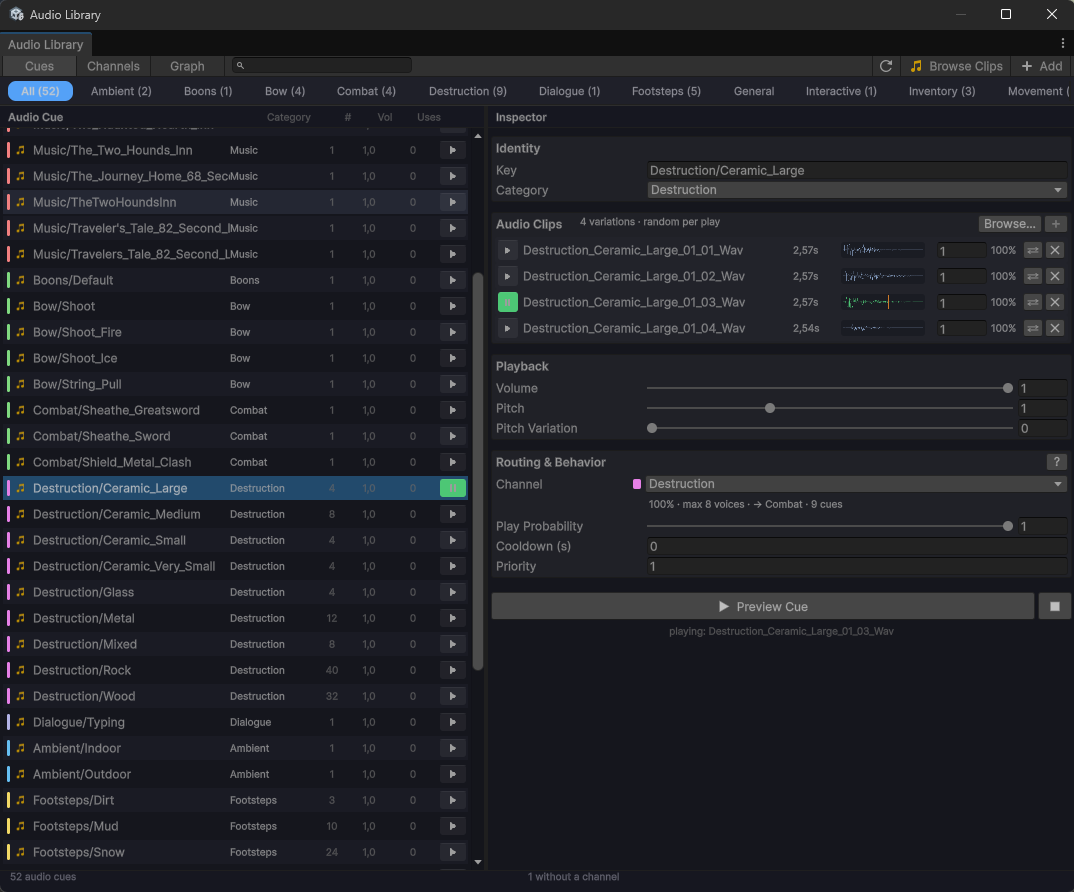
- Cues - the list, with an inspector for the selected cue
- Channels - create and manage channels, see which cues use them
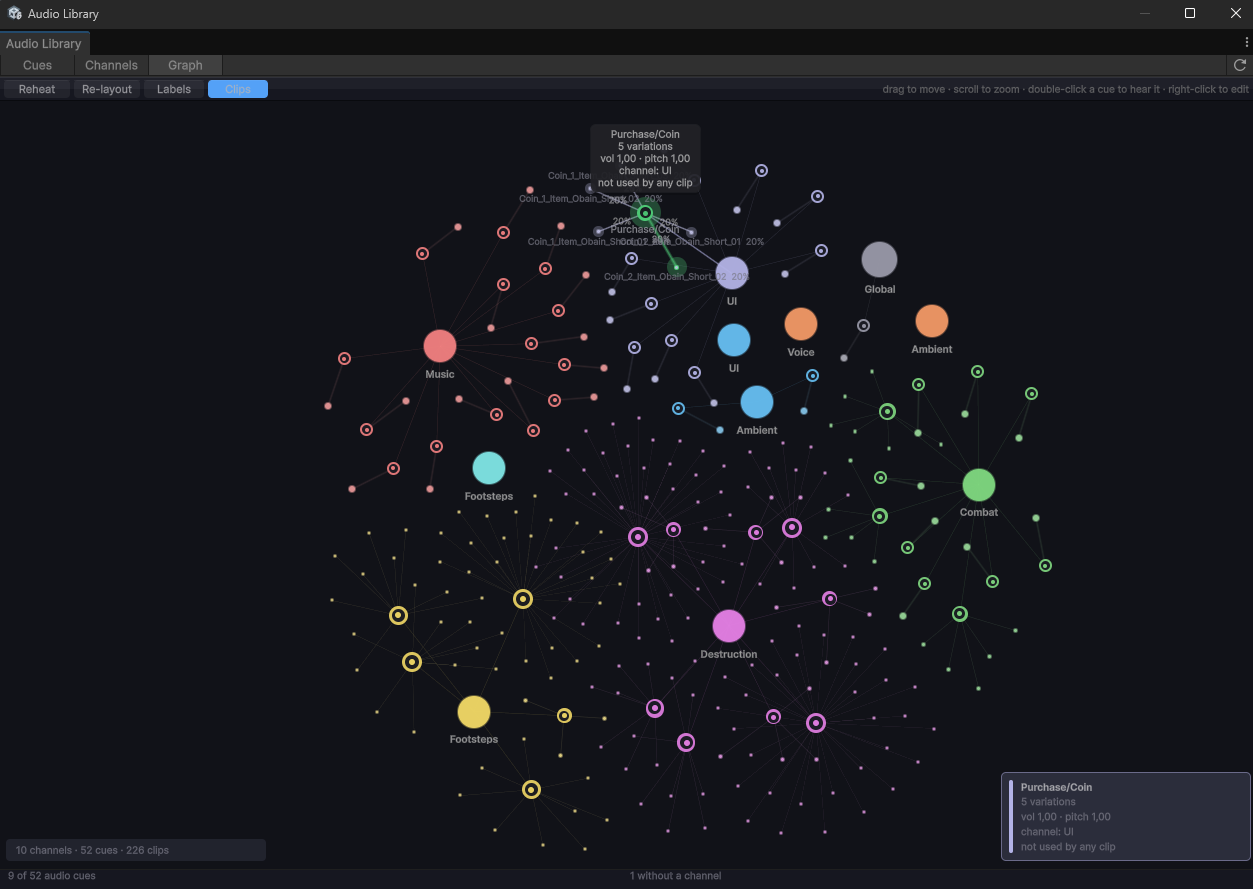
- Graph - channels, cues and clips as a force-directed map; double-click a cue to hear it
Cues and variations
A cue is a named sound. It holds one or more clips, and every play rolls one of them by weight - that is how nine footstep recordings become one Footstep cue instead of nine things to trigger.
Per cue you can set:
| Setting | Effect |
|---|---|
| Volume / Pitch / Pitch Variation | Base playback values; variation is applied per play |
| Channel | Group for mute, volume, voice limiting and mixer routing |
| Play Probability | Dice roll per trigger. 1 = always |
| Cooldown | Minimum seconds between two plays of this key, across all characters |
| Priority | Protection from voice stealing when a channel runs out of voices |
| Category | Organisation only - filters the list |
Building cues
- Import turns a whole folder of sounds into cues in one pass - see Importing a folder below.
- Browse Audio Clips… opens the clip browser: audition clips from the project, then turn the selection into a cue. Selecting several clips creates one cue with those clips as variations, named after their shared prefix -
Footstep_01…09becomesFootstep. - Drag clips from the Project window onto the cue list to create cues, or onto a cue's clip section to add variations.
- Inside a cue, variations can be selected and dragged onto another cue in the list - hold Ctrl to copy instead of move. Weights travel with them.
Importing a folder
Import opens the review window straight away - no folder dialog first - and derives cues from a folder of sounds: clips whose names differ only by a take marker (Footstep_01, Footstep_02, Sword_v2, Hit_A/Hit_B) become one cue with variations, and the folder name becomes the category - skipping folders that only say audio lives here, so Barbarians/Sounds gives you a Barbarians category rather than a Sounds one.
It starts where you imported last (or at a watched folder, or the whole project). To point it somewhere else: drag a folder in from the Project window, right-click a folder in the tree → Import Only This Folder, or use the … button above the tree.
Nothing is written until you say so:
| Grouping | Switch between Per file, Per name (default) and Per folder. The cue count updates as you switch, so you pick by result rather than in the abstract. Per folder suits packs organised as one folder per sound. |
| Folders | The tree on the left; untick a branch to leave it out. Ticking it again brings it back with your edits intact. |
| Merge / Split | Select several rows and Merge them into one cue (named after their shared prefix), or Split a cue back into one cue per clip. |
| Rename / Exclude | Rename a cue in the detail pane, or drop rows you do not want. |
| Badges | New, +3 (an existing cue gains three clips) or Up to date, updated live as you edit. |
Every row is auditionable before you commit - play buttons and waveforms on the cue and on each of its clips.
:::tip Safe to re-run Importing the same folder again only adds what is missing. Volume, pitch, channel, cooldown, priority and category of existing cues are never touched, so re-importing after an asset pack update will not undo your tuning. :::
Import & Watch additionally re-runs the import whenever new audio lands in that folder - silently, with no window. Because that background run uses the default Per name grouping, it is only offered for a plan you have not reshaped by hand. Watched folders are managed from the dropdown on the Import button.
Preview
Everything is auditionable without entering Play Mode: play buttons on cues and on individual variations, scrubbable waveforms, and a playhead. The cue that is currently sounding lights up green in the list and in the graph.
:::note Preview is not the mixer The editor preview goes through Unity's preview audio channel - it bypasses the AudioListener and the mixer. Channel volume, channel mute and mixer effects are not audible there. Test those in Play Mode. :::
Runtime Playback
Events play in builds via the AWSFXManager component, which reads a baked, runtime-loadable database (with a Resources fallback). Baking happens automatically - the database is rebaked before every player build, and refreshed on entering Play Mode whenever the Audio Library has changed.
No manual step needed. Tools → Animation Workbench → Bake Runtime Audio Database still exists if you ever want to force a rebake.
See Audio Integration for the full runtime picture.
Feel Integration (optional)
If Feel (MoreMountains) is installed, spawn/audio events can trigger MMF_Player feedbacks. The integration is reflection-based - Feel is not required and there is no compile-time dependency.