Character Setup
Almost everything visual in Animation Workbench needs a rig to play clips on - thumbnails, previews, pose editing, comparison. This page is about picking that rig and keeping it healthy.
The Characters window
Tools → Animation Workbench → Characters (Ctrl+Shift+C)
It scans the project for prefabs with an Animator and lists them, humanoid and generic. From there you mark one - or several - as default character.
A character needs:
- To be a prefab
- An Animator component
- A Humanoid avatar, for humanoid previews and pose editing
Generic rigs are listed and can be previewed, but IK and mirroring depend on what can be resolved from their hierarchy.
Finding a character
Ctrl+F puts the caret in the search field; Esc clears it. The search matches the name and the asset path, and it matches gaps too - hs04 finds HumanSpecies_04.
The ⇅ pill sets the order:
| Sort | Puts on top |
|---|---|
| Name | A to Z |
| Clip Count | The rigs the most clips in your library fit |
| Bone Count | The densest rigs |
| Recent | Most recently changed on disk |
| Status | Whatever the health check has something to say about |
Clip Count is the same number the tile carries in its bottom-left corner. It is worked out in the background, so a large library shows counting clips… next to the character count for a moment and then settles into its final order.
▦ / ☰ switch between the grid and the list; Ctrl/Cmd + mouse wheel scales the tiles or the row height.
What a click does:
| Click | Selects - an accent ring in the window, and the prefab in the Inspector |
| Double-click | Opens Create Clip for that character |
| Middle-click, or right-click ▸ Ping | Reveals it in the Project window |
| Drag | Drops the character into the scene or the hierarchy |
| Esc | Clears the selection |
A muted accent border marks the current default character.
How the preview character is chosen
Marking a default applies an asset label to the prefab. That is why the choice syncs across the project and survives being committed and pulled by a colleague.
Resolution walks this order, first hit wins:
- A per-clip override, if that clip has one
- The pipeline-specific label -
AWDefaultCharacter_URPon URP,AWDefaultCharacter_HDRPon HDRP and built-in - The plain label
AWDefaultCharacter
:::tip Why two labels A character whose materials only look right in URP is useless in an HDRP project and vice versa. Labelling per pipeline lets one project - or one shared asset library - carry both, and the right one is picked automatically.
If you only ever ship one pipeline, the plain AWDefaultCharacter label is all you need.
:::
You can also set labels by hand in the prefab inspector; the window and the labels are two views of the same thing.
Per-clip overrides
Some clips only make sense on a specific rig - a quadruped cycle, a vehicle, a boss with a non-standard skeleton. Assign a preview character for that one clip from the browser and it overrides the default wherever the clip is shown.
Bone match analysis
For a given clip and character, the window scores how well the rig matches the clip's bindings. That score answers the question "why does this look wrong on this character?" before you go looking for a bug - usually the answer is that the clip was authored on a different skeleton.
The score is also available as a rule condition, so you can filter a whole library by it. See Palettes & Rulesets.
Character Diagnostics
Tools → Animation Workbench → Character Diagnostics
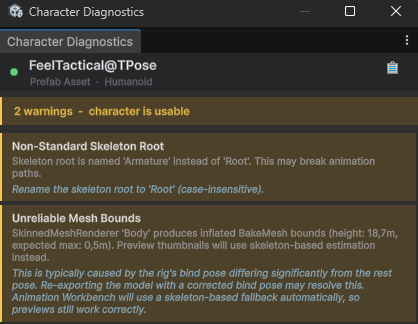
The tool for when previews are blank, poses look broken, or a character will not take a clip. It inspects the avatar and rig setup and reports what is wrong rather than leaving you to guess.
Start here before filing a bug - most "no preview" reports resolve to a missing avatar or a rig mismatch it can name.
Where clips are used
Animation Workbench tracks which Animator Controllers reference a clip, and which characters use those controllers. The browser context menu has Used In Project entries, so you can go from a clip to the controllers and characters that play it - and sort the whole library by usage to find what nothing references any more.
Used In Project → Scenes goes one step further and names the objects. Picking a scene selects everything in it that uses the clip and prints the hierarchy paths to the console. Entries marked (open) are scenes you already have loaded - those cost nothing. For the rest you are asked first, because the answer only exists in a loaded scene: open it on its own, or additively next to the scene you are working in. That question also tells you what the scene reaches the clip through - the prefab, or the controller - which is frequently the whole answer you wanted ("ah, that is just the spawner"), and then you can cancel. If nothing in the scene plays the clip - a spawner that holds a prefab that does, for instance - you are offered a second, slower pass that searches every component for the reference.