Audio Integration
How Animation Workbench audio gets from the Audio Library into your running game - scene setup, the runtime API, channels, and what to check when you hear nothing.
If you only want to place a sound on a frame, Events & SFX is the shorter read. This page is for wiring audio into your own code.
The moving parts
| Piece | What it is | Where it lives |
|---|---|---|
| Audio Library | Where you author cues. Editor-only. | Assets/Settings/AnimationWorkbench/Data/AWAudioLibrary.asset |
| Cue | A named sound: one or more clips, plus volume, pitch, probability, cooldown, channel. | Inside the library |
| Audio Channel | A group for muting, volume, voice limiting and mixer routing. | ScriptableObject asset |
| Runtime Audio Database | The baked, build-ready copy of the library. | Assets/Settings/AnimationWorkbench/Resources/AWRuntimeAudioDatabase.asset |
| AWSFXManager | The component that actually plays things. One per game. | A GameObject in your scene |
| AWAudioEventReceiver | Per-character entry point for animation events. | On your character prefab |
A cue key is just a string - "Footstep_Mud", "Sword_Swing". That is the only contract between your code and the library. There is no generated constants class, so nothing about this changes between the DLL and the source version of the asset.
Scene setup
You need exactly one AWSFXManager in the game. It is a singleton: it survives scene loads via DontDestroyOnLoad, and a second one destroys itself on Awake.
The fastest route: open any Audio Event asset (or the event inspector in the Keyframe Editor). If no manager exists in the scene, a warning with a ➕ Create Audio System button appears - that creates an AW_AudioSystem GameObject with the component on it.
Then select that object and hit Set up everything in its inspector. It fills in whatever is missing:
- Audio Mixer - duplicates the shipped
AW_DefaultAudioMixerand wires up itsSFXandMusicgroups - Runtime Audio Database - bakes one if none exists
- SFX Source Prefab - creates a default pooled
AudioSourceprefab - Music Source - adds a
MusicSourcechild
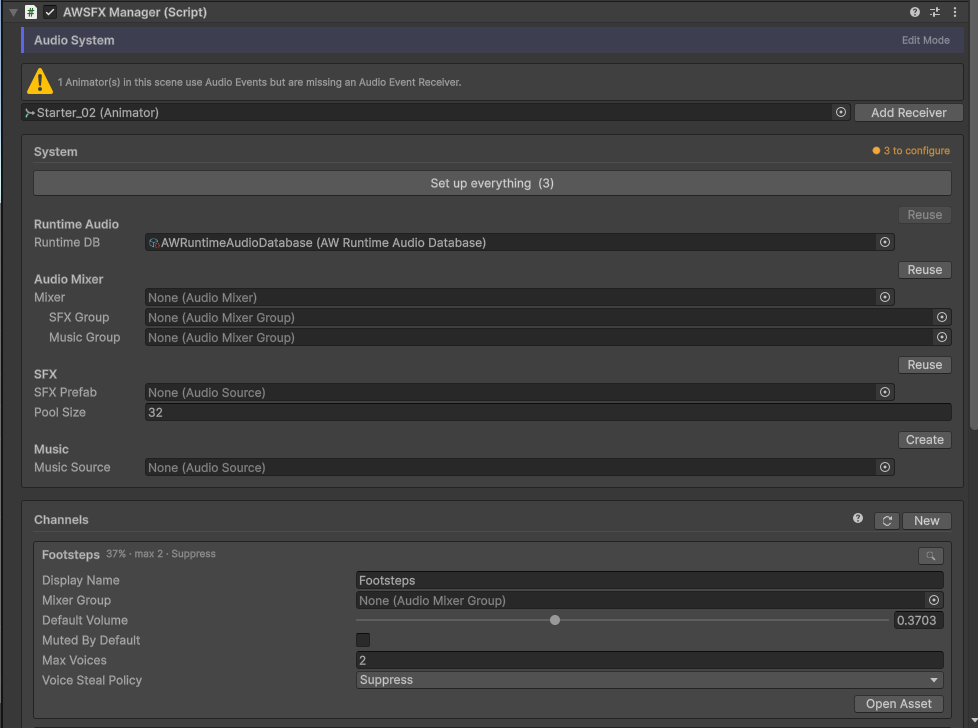
:::caution SFX Source Prefab is the one field you must fill
The voice pool is built from it on Awake and there is no default. Leave it empty and nothing plays - you get one console error naming the field, not sound.
The other two look after themselves: the Runtime Audio Database falls back to Resources.Load("AWRuntimeAudioDatabase") (exactly where the baker puts it), and a Music Source is created as a child object if you did not assign one.
:::
Characters
Any character that should play audio from animation events needs an AWAudioEventReceiver (which requires an Animator). The manager's inspector lists animators that are missing one and offers Add Receiver to all.
Code-triggered sounds do not need a receiver - but passing one gives you per-character mute and channel override for free.
Playing sounds from code
using AnimationWorkbench;

// 2D, at the manager's position - UI, notifications, non-diegetic sounds
AWSFXManager.Instance.Play("UI_Confirm");

// 3D, at a world position
AWSFXManager.Instance.Play("Impact_Wood", hit.point);

// 3D, quieter
AWSFXManager.Instance.Play("Impact_Wood", hit.point, spatial: true, volumeScale: 0.5f);

// Music (loops, 2D, routed to the Music mixer group)
AWSFXManager.Instance.PlayMusic("Ambient_Cave");
With a character in play, go through its receiver instead. It applies that character's mute state and channel override:
var receiver = GetComponent<AWAudioEventReceiver>();
receiver.Play("Footstep_Mud");   // at the character's position, spatial
:::tip Guard the singleton during startup
AWSFXManager.Instance is assigned in Awake. Code running in another Awake in the same frame may see null. Use AWSFXManager.Instance?.Play(...), or trigger from Start onwards.
:::
Checking keys before you ship
An unknown key is silently ignored at runtime (with a one-time console warning in the editor). If you want to catch typos yourself:
var db = AWSFXManager.Instance.audioDatabase;

if (!db.Contains("Footstep_Mud"))
    Debug.LogWarning("Cue missing - was the library re-baked?");

// All baked cues, e.g. to build your own key dropdown
foreach (var entry in db.Entries)
    Debug.Log(entry.key);
What happens on every trigger
Understanding the order explains most "why did that not play" questions:
- Gates, in registration order - each one can veto or modify the playback:
AWMuteGate- global mute, receiver mute, channel mute; multiplies in the channel volumeAWProbabilityGate- the cue'splayProbabilitydice rollAWCooldownGate- minimum seconds between two plays of the same key (unscaled time, shared across all characters)
- Voice limiting - if the channel has a
maxVoicesbudget and it is full, the steal policy decides - Clip roll - one variation is picked by weight
- Pitch - base pitch ±
pitchVariation, clamped to a minimum of0.01 - Routing -
channel.mixerGroupif set, otherwise the manager'sSFXgroup
The same pipeline runs for animation events and for Play(key, …). A sound triggered from code obeys the same cooldowns and mute states as one triggered from a frame.
Channels
Channels group cues for control. Assign one per cue in the library, or override it per character on the receiver (the character wins).
AWSFXManager.Instance.SetChannelVolume(footstepsChannel, 0.4f);
AWSFXManager.Instance.SetChannelMuted(dialogueChannel, true);

AWSFXManager.Instance.GlobalMuted = true;   // all SFX, music unaffected
:::note A mixer group is optional
Mute, channel volume and voice limiting are handled by the manager, not the mixer - they work on a channel with no AudioMixerGroup assigned. You only need one for what the mixer itself does: ducking, effects, snapshots, exposed parameters.
Without one, voices go to the manager's SFX group; with that empty too, straight to the AudioListener.
:::
Channel settings live on the asset as authoring defaults. Runtime mute and volume are held by the manager, so muting something in Play Mode never writes back into your asset.
Voice limiting
Set maxVoices on the channel (0 = unlimited) and pick what happens when the budget is full:
| Policy | Behaviour |
|---|---|
Suppress | The new sound is dropped |
StealOldest | The channel's longest-running voice is stopped |
StealQuietest | The channel's quietest voice is stopped |
A cue's priority protects it: a voice is never stolen by a sound of lower priority. If nothing is stealable, the new sound is suppressed.
Custom rules (gates)
IAWAudioGate is public, so your own policies run in the same pipeline as the built-in ones - no forking required:
using AnimationWorkbench;

public sealed class UnderwaterGate : IAWAudioGate
{
    public bool PlayerIsUnderwater;

    public bool Evaluate(ref AWAudioPlayContext ctx)
    {
        if (!PlayerIsUnderwater)
            return true;

        ctx.Volume *= 0.3f;   // muffle instead of veto
        ctx.Pitch  *= 0.85f;
        return true;
    }
}

// Register once, e.g. in Start
AWSFXManager.Instance.AddGate(new UnderwaterGate());
Gates run before a voice is claimed, so a veto costs nothing. Keep them allocation-free - they run on every trigger. RemoveGate and GetGate<T>() are there for turning them off again.
Baking
The runtime database is baked from the library automatically:
- Before every player build - always, because a stale database inside a shipped build is the expensive failure
- On entering Play Mode - only if the library is newer than the database, so no asset write on every play
Tools → Animation Workbench → Bake Runtime Audio Database forces it manually. You should not need it.
Referencing the assembly from your own code
Runtime types live in the AnimationWorkbench namespace, in AnimationWorkbench.Runtime.
- No assembly definition (your scripts are in
Assembly-CSharp) - nothing to do. It just resolves. - Your own asmdef - add the reference:
- DLL version (Lite, and Pro before installing source): add
AnimationWorkbench.Runtime.dllunder Assembly References. A precompiled DLL cannot be referenced by asmdef name. - Pro with source installed: add
AnimationWorkbench.Runtimeunder Assembly Definition References instead.
- DLL version (Lite, and Pro before installing source): add
:::caution Switching a Pro project to source changes the reference type If you set your asmdef up against the DLL and later run Install Source Code…, the DLL is gone and your reference breaks. Swap it for the asmdef reference in the same step. :::
Nothing in the audio pipeline is edition-gated. Pro detection lives in an editor-only assembly that does not exist in a build, so playback, channels and gates behave identically in Lite and Pro.
No sound - a checklist
| Symptom | Check |
|---|---|
| Nothing plays, anywhere | Is there an AWSFXManager in the scene? Is AWSFXManager.Instance non-null when you call it? |
| Console: "RuntimeAudioDatabase not found" | Bake the database, or assign it on the manager |
| Console: "SFX key 'x' not found" | The key is not in the baked database - re-bake, or check the spelling against the library |
| Console: "No SFX Source Prefab assigned" | Assign one on the manager, or press Set up everything |
| Animation events silent, code triggers fine | The character is missing an AWAudioEventReceiver, or the receiver is muted |
| One cue is silent, others fine | playProbability below 1, a cooldown still running, or its channel is muted / out of voices |
| Silent only in a build | The database is baked into …/Resources/, so it must not have been moved out of a Resources folder |
| Editor preview works, Play Mode does not | Preview bypasses the mixer entirely - check your mixer group volumes and the channel's runtime volume |